Master Tabbed Form

Section 1 Contact and Agent Information

Who is this order for?
This is who we will contact about your order.

2 Order Type

Is this order for a property, or for a service / business?
Please ensure your campaign content is relevant to the real estate community! All orders include a quick team review to ensure alignment with our audience before approval. Thank you.
Is this a new order or a reorder of a previous campaign (same flyer file, etc.)?
Please select from your past orders below

No Entries Found

Section 3 Property Information

Your Eflyer Content:
Design Options
Flyer Headlines:

Tip: the less number of characters you use, the larger the font we can use.

Enter the subject line your recipients will see in their inbox.

Maximum file size: 3221.23MB

Maximum file size: 3221.23MB

Upload your flyer file as .html, .htm, or .txt. If your file is in another format, please convert it before uploading.

Maximum file size: 3221.23MB

Section 4 Email Areas

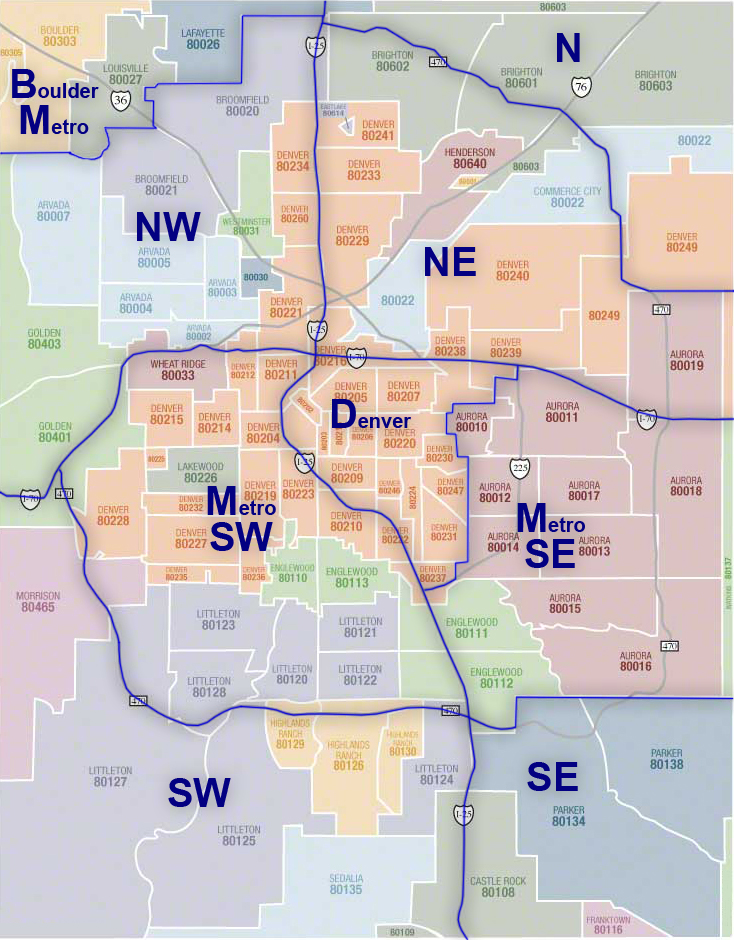
Select one ore more coverage areas to include in your campaign:

Section 5 Options

Optional Add-On


Multi-Wave Marketing
Schedule a Follow-Up Campaign & Save 20%
Maximize your listing's momentum by scheduling a future follow-up campaign today. Securing your resend now locks in an exclusive 20% discount off our standard rate—perfect for promoting an upcoming Open House, a price adjustment, or a secondary push to agents.
Do you want to resend this flyer on a future date?

Optional Add-On


Buyer Agent Outreach
Add One-Click Commission Marketing – Only $5 (Save 50%)
Maximize your listing's exposure by automatically pushing your commission data to CommissionReport.com alongside your Eflyer campaign. This gives buying agents an easy, centralized way to instantly verify your compensation offer off-the-MLS. Double your visibility and streamline agent inquiries for just $5.
Would you like us to post your listing's information on CommissionReport.com?
Permission Confirmation

Section 6 Checkout and Submit

Add New Property

Save a property to your account so you can quickly select it for future campaigns. Enter the property details below.

Close
Property Directory

No saved draft yet.

Start a campaign and use the “Save Draft” button to save your progress as you go. You can step away and pick up right where you left off.

Add New Agent

Save an agent to your account so you can quickly select them for future campaigns. Enter the agent’s name and email below.

Close
Agent Directory